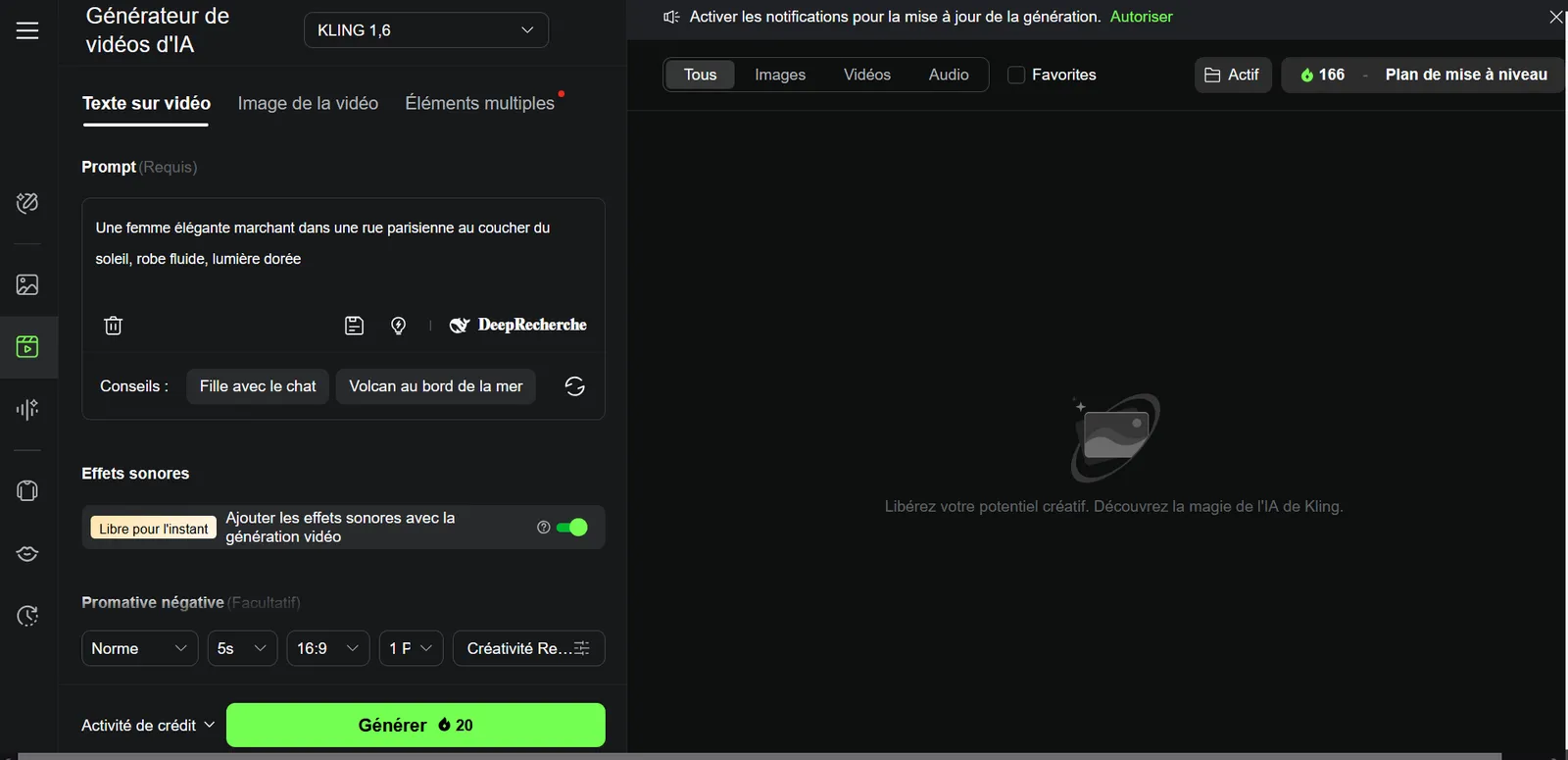
- Kling (free) = best free video generation quality
- Vidnoz = the most complete free tool (avatars + text-to-video + face swap)
- Fliki = best free text-to-video (5 min/month)
Generating videos with AI without spending a dime is possible in 2026. But let's be honest: most "free tools" are disguised trial versions with well-hidden limits. We compared every free plan on the market, based on public pricing, to tell you what is truly free, what is not, and where the traps are.
Spoiler: there are real good free options. But you need to know where to look -- and above all, know the limits before wasting time. This guide is made for that.
The free ranking 2026 -- Comparison table
| # | Tool | What is free | Rating | Try |
|---|---|---|---|---|
| 🥇 | Kling (free) | 66 credits/day, 720p | 9.0/10 | Try → |
| 🥈 | Vidnoz | 3 min/day, avatars, AI voices | 8.5/10 | Try → |
| 🥉 | Fliki | 5 min/month, text-to-video | 8.0/10 | Try → |
| 4 | InVideo | 10 min/week, watermark | 7.8/10 | Try → |
| 5 | Pika | 150 credits/month, 720p | 7.5/10 | Try → |
| 6 | CapCut | Unlimited editing, 1080p | 7.3/10 | Try → |
#1 -- Kling AI (free): the best quality without paying
 Kling AI
🏆 #1 free
9.0/10
Kling AI
🏆 #1 free
9.0/10
Kling AI by Kuaishou offers the most impressive free plan in terms of raw quality. With 66 credits per day (yes, per day, not per month), you can generate AI videos in 720p with cinematic camera movements and stunning physical coherence. It is probably the only free tool whose quality comes close to paid versions.
What is TRULY free
- 66 credits/day -- about 6-10 short videos per dayFree
- Text-to-video generation -- prompts in English acceptedFree
- Image-to-video -- animate your photosFree
- 720p resolution -- suitable for social mediaFree
What you have to pay for
- 1080p resolution -- requires the Standard plan$6.99/month
- Long videos (10s+) -- limited on free planPaid
- No watermark -- the free plan adds a discreet watermarkPaid
- Server priority -- longer wait times on free planPaid
- 66 credits/day -- the most generous on the market
- Quality close to paid -- same AI model
- No credit card required -- email signup is enough
- Daily credits -- renew every day
- 720p max (no Full HD)
- Kling watermark on videos
- Duration limited to 5 seconds
- Queue during peak hours
#2 -- Vidnoz: the most complete 100% free
 Vidnoz
🆓 Most complete
8.5/10
Vidnoz
🆓 Most complete
8.5/10
Vidnoz is the most complete free platform on the market. Where most free tools give you a single feature, Vidnoz offers you a complete package: AI avatars, text-to-video, face swap, AI voiceover in 140+ languages. All without pulling out your credit card. The interface is multilingual and the voice quality is decent.
What is TRULY free
- 3 minutes of video/day -- with AI avatarsFree
- 800+ avatars -- wide and varied selectionFree
- 470+ AI voices in 140 languages including EnglishFree
- Face swap -- functional on free planFree
- No credit card requiredFree
What you have to pay for
- HD/Full HD resolution -- free plan is 480p$19/month
- No watermark -- free plan adds "Vidnoz"Paid
- More than 3 min/day -- Starter plan for morePaid
- Premium avatars -- the most realistic ones are paidPaid
- Most versatile -- avatars + video + voice + face swap
- Multilingual interface
- No credit card -- simple free signup
- Daily credits -- 3 min renew every day
- 480p only -- low quality
- Visible watermark
- Avatars less realistic than HeyGen/Synthesia
- 3 min/day = quite limited for regular content
#3 -- Fliki: the best free text-to-video
 Fliki
📝 Text-to-video
8.0/10
Fliki
📝 Text-to-video
8.0/10
Fliki transforms any text into video with AI voiceover. Its free plan offers 5 minutes of video per month -- enough to create 1 to 2 short quality videos. The scene-by-scene editor is intuitive, the 2000+ voices cover 80+ languages, and English support is excellent. It is the best free choice for turning an article or script into a finished video.
What is TRULY free
- 5 min of video/month -- no credit cardFree
- AI voices in English (limited selection but OK quality)Free
- Stock footage -- access to basic mediaFree
- Scene-by-scene editor -- functionalFree
What you have to pay for
- No Fliki watermark$21/month
- More than 5 min/monthPaid
- Premium voices -- the best English voicesPaid
- Full HD resolutionPaid
- AI avatars -- reserved for Standard+ planPaid
- 5 min/month -- generous for text-to-video
- 2000+ voices (free selection)
- Multiple sources -- text, URL, PPT
- No credit card required
- Visible Fliki watermark
- 5 min/month only
- Premium voices reserved for paid plans
- No Full HD
#4 -- InVideo AI: the simplest for beginners
 InVideo AI
🎯 Beginners
7.8/10
InVideo AI
🎯 Beginners
7.8/10
InVideo AI is the most accessible video generator: you describe your video in text (even in English), and the AI generates a complete edit with stock footage, music, voiceover and subtitles. The free plan lets you test the tool and create short videos. The "prompt and it's ready" approach is ideal if you have no editing experience.
What is TRULY free
- 10 min of video/weekFree
- Text to video prompt -- in EnglishFree
- HD stock footage included (16M+ media)Free
- Basic AI voiceoverFree
What you have to pay for
- No InVideo watermark$25/month
- Full HD 1080p exportPaid
- More than 10 min/weekPaid
- Premium voiceoverPaid
- The simplest -- prompt and it's ready
- 10 min/week -- enough to test
- Stock footage included
- English supported
- Very visible InVideo watermark
- Results sometimes generic
- No free 1080p
- Videos based on stock (no pure AI generation)
#5 -- Pika: AI video generation for the curious
Pika offers 150 free credits per month to generate AI videos from text or images. It is a good tool to experiment with AI video generation without commitment. The interface is ultra-intuitive and the results are decent for a free tool, even though the quality no longer rivals Kling in 2026.
What is TRULY free
- 150 credits/month -- about 15-20 short videosFree
- Text-to-video and image-to-videoFree
- Simple interface -- no experience neededFree
What you have to pay for
- 1080p resolution$8/month
- No watermarkPaid
- More creditsPaid
- Server priorityPaid
- 150 credits/month -- decent for testing
- Ultra-simple interface
- No credit card required
- Good for experimenting
- 720p max with watermark
- Lower quality than Kling in 2026
- Long generation times
- Monthly credits (not daily)
#6 -- CapCut: the free editor (not the generator)
CapCut is not an AI video generator per se -- it is a free video editor with built-in AI features. But if you already have video content and want to enhance it with AI (auto subtitles, background removal, effects), it is the best free choice on the market. Editing is unlimited and 1080p export is free.
What is TRULY free
- Unlimited video editing -- multi-track timelineFree
- 1080p export -- the only one offering this for freeFree
- Automatic subtitlesFree
- Basic AI effects -- background removal, filtersFree
- TikTok templatesFree
What you have to pay for
- 4K export$8/month
- Advanced AI effects -- style transfer, etc.Paid
- Extended cloud storagePaid
- Unlimited editing -- no quota
- Free 1080p -- unique on the market
- Multi-platform -- mobile, desktop, web
- 500M+ users
- No AI video generation (it's an editor)
- ByteDance (data privacy)
- Advanced AI effects are paid
⚠️ The traps of free plans -- what they don't tell you
Many tools present themselves as "free" but hide significant limits. Here are the most common traps we identified while testing all these tools.
Trap #1: The strategically placed watermark
Almost all free tools add a watermark. Some place it discreetly at the bottom, others put it right in the center of the video. Kling and Pika are the most discreet. InVideo is the most aggressive -- the watermark covers a good part of the video and makes the content hard to use professionally.
Trap #2: The throttled resolution
Most free plans are limited to 480p or 720p. In 2026, publishing in 480p on YouTube or Instagram is algorithmic suicide -- platforms penalize low-resolution videos. Only CapCut offers free 1080p (but it's an editor, not a generator). For AI generators, 1080p is systematically paid.
Trap #3: Credits that melt away
"66 free credits" sounds great. But a 5-second video uses 10 credits on Kling. That gives you about 6 videos/day. On Pika, 150 credits/month = about 15 videos. Always calculate in actual number of videos, not in displayed credits.
Trap #4: The disguised free trial
Some tools offer a "free plan" that is actually a 7-day free trial with credit card required. If you forget to cancel, you get charged. We verified: Kling, Vidnoz, Fliki, Pika and CapCut are real free plans without a credit card. Be wary of the others.
Trap #5: Deliberately degraded quality
Some tools use an inferior AI model for free plans. You get a mediocre result, you pay, and the quality is suddenly much better. It's a conversion technique. Kling is the notable exception: the same AI model is used on free and paid plans.
Which free tool to choose based on your needs?
🎯 Simulator -- Which free AI video tool is right for you?
1. What do you want to create?
FAQ -- Free AI video tools
What is the best 100% free AI video tool in 2026?
For AI video generation: Kling AI with its 66 free credits/day offers the best quality. For a complete tool (avatars + voice + video): Vidnoz is the most generous without a credit card. For video editing: CapCut is unbeatable with its unlimited editor in 1080p.
Can you really create professional videos for free?
Honestly, not really. Free plans all add a watermark (except CapCut for editing) and limit the resolution to 720p or 480p. For professional content without a watermark in 1080p, you need to upgrade to a paid plan. The most affordable is Kling Standard at $6.99/month -- it's the best value for money on the market.
Do free plans require a credit card?
Kling, Vidnoz, Fliki, Pika and CapCut do not require a credit card for their free plan. This is an important point: you can test without risk of being charged. Be wary of tools that offer a "free trial" with a credit card required -- it's often a trap.
Kling free vs Pika free: which is better?
Kling free is superior in 2026. It offers 66 credits/day (vs 150/month on Pika), uses the same AI model as the paid version, and produces videos with more natural movements. Pika remains simpler to access for a first experimentation.
How to maximize a free plan?
Our tips: 1) Combine multiple free tools (Kling for generation, CapCut for editing, Fliki for text-to-video). 2) Use the daily credits from Kling and Vidnoz every day to accumulate content. 3) Write your prompts precisely to avoid wasting credits on failed generations.
When should you upgrade to a paid plan?
When you need: 1080p without watermark (mandatory for professional YouTube/Instagram), more volume (free credits are no longer enough), or advanced features (premium avatars, HD voices, server priority). The smartest tier is Kling Standard at $6.99/month -- it's the price of a coffee and it completely changes the game.