
- Bewertung: 9.2/10 — the best value for money in AI video generation in 2026
- Preis: from $6.99/month (free plan with 66 credits/day available)
- Für: video creators, marketers, YouTubers who want cinema quality at a low price
- Dagegen: no presenter avatars (go to HeyGen for that)
Was ist Kling AI?
Kling AI is an AI video generator developed by Kuaishou (the Chinese competitor to TikTok, 600M+ users). Launched in 2024 and having become a benchmark in 2025-2026, it lets you create videos from text or images with quality that rivals Runway and Sora — but at a fraction of the price.
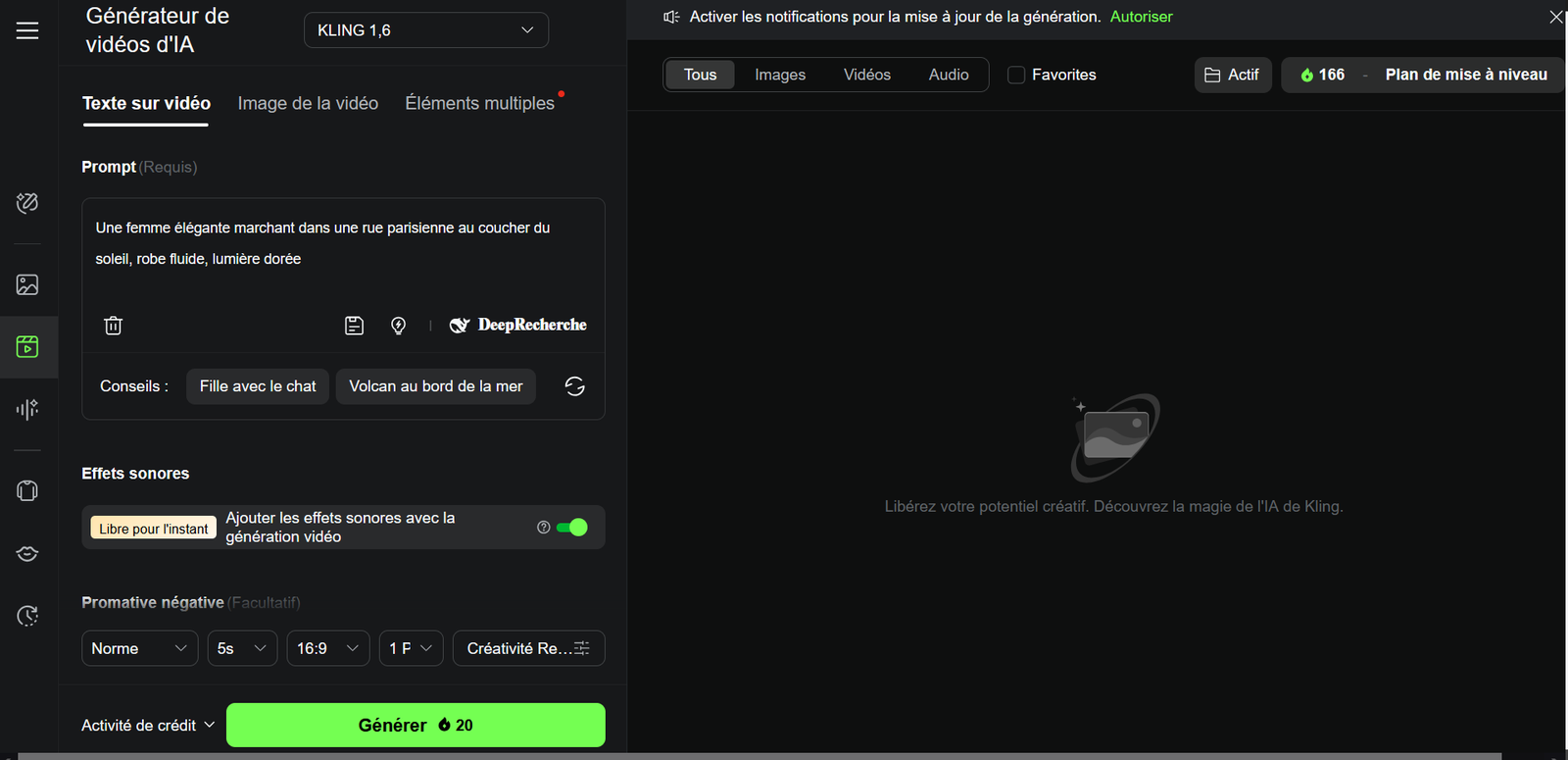
What sets Kling apart from the competition: cinematic camera movements, realistic physics (water, fabric, light), native 1080p resolution and one of the most generous credit systems on the market. In 2026, Kling is at version 1.6 with major improvements to motion consistency and native audio.
Kling AI is ranked #1 in our Bester KI-Video-Generator 2026 and Bestes kostenloses KI-Video-Tool 2026.
6 Hauptfunktionen of Kling AI
1. Text-to-Video — generate a video from text
Describe your scene in text (even in French) and Kling generates a 5-10 second video in 720p or 1080p. The quality is impressive: fluid movements, realistic physics, visual consistency. You can choose the ratio (16:9, 9:16, 1:1), the duration and the creativity level.
2. Image-to-Video — animate any image
Upload a photo or illustration and Kling animates it with natural movements. Perfect for bringing product visuals, illustrations or photos to life. The result is often stunning — the AI understands depth and textures to create believable motion.
3. Native Audio — generated sound effects
New in 2026: Kling can add synchronized sound effects to the video. Not background music, but ambient sounds (wind, footsteps, water, distant voices) that make the video more immersive. Free on all plans.
4. Multiple Elements — complex scene composition
The "Multiple Elements" mode lets you combine several reference images into a single scene. You define the main subject, the setting and the secondary elements — the AI composes everything coherently.
5. AI Effects — creative transformations
Kling's "Effects" enable creative transformations: turning a photo into an anime-style animation, applying cinema effects (AI slow-mo, season change), or creating impossible transitions between two images.
6. DeepSearch — AI-optimized prompts
The DeepSearch function analyzes your prompt and automatically reformulates it to get the best possible result. Useful when you don't know exactly how to describe the scene you want.
Write your prompts in English for better results, even though the interface is in French. Kling understands detailed descriptions better in English. Example: instead of "une femme qui marche", write "a woman walking gracefully through a Parisian street at golden hour, flowing dress, cinematic lighting".
Videoqualität: Our Real Test
We generated 50+ videos on Kling AI for this test. Here are our detailed observations:
✅ Was uns beeindruckt hat
- Camera movements — tracking shots, zooms and pans are fluid and cinematic. Kling handles complex movements better than Pika or Seedance.
- Realistic physics — water flows naturally, hair moves with the wind, fabrics wrinkle believably.
- Temporal consistency — over 5 seconds, the subject stays stable. Less weird "morphing" than the competition.
- Auflösung — the 1080p is sharp and usable for YouTube or social media.
⚠️ Schwachpunkte
- Hands and fingers — like all AI generators in 2026, hands remain a weak point (extra fingers, deformations).
- Text in image — Kling cannot generate able text within videos.
- Close-up faces — face close-ups can have micro-deformations over time.
- 5 seconds is short — the extended mode (10s) is on the paid plan and quality decreases slightly after 7s.
Kling AI Preise 2026 — Vollständige Details
| Plan | Preis/Monat | Credits | Auflösung | Max. Dauer |
|---|---|---|---|---|
| Free | $0 | 66/day (renewed) | 720p | 5s |
| Standard ⭐ | 6,99$ | 660/mois | 1080p | 10s |
| Pro | 29,99$ | 3 000/mois | 1080p | 10s |
| Premier | 99,99$ | 12 000/mois | 1080p | 10s |
The Standard plan at $6.99/month is the sweet spot. You unlock 1080p and the 10-second mode for the price of a coffee. The free plan (66 credits/day) is enough for testing, but 720p is too limited for professional use. The Pro plan ($29.99) is only justified if you produce in volume (>15 videos/week).
Who Ist Kling AI Für?
Stärken & Schwächen — Die Zusammenfassung
- Unbeatable price — $6.99/month for cinema quality
- Generous Free Plan — 66 credits/day, no credit card
- Top 3 Videoqualität — rivals Runway and Sora
- Native audio — synchronized sound effects included
- French interface — rare in this segment
- Cinematic movements — the best on the market at this price
- Various modes — text-to-video, image-to-video, effects, multiple elements
- Frequent updates — version 1.6 with major improvements
- Max 10s duration — no long videos
- No avatars — no AI presenter
- Imperfect hands — like all AI generators
- Queue wait time — during peak hours on free plan
- Credits run out fast — 20 credits per standard video
- No built-in editing — you must assemble clips elsewhere
Unser Urteil
The best value for money in AI video generation
Kling AI has redefined what you can expect from an affordable AI video generator. The quality rivals tools 3 to 5 times more expensive (Runway, Sora). The free plan (66 credits/day) is the most generous on the market — enough to seriously test before committing. The Standard plan at $6.99/month is probably the best investment in AI video in 2026.
Only downside: if you need an AI presenter or long videos (>10s), Kling isn't the right tool for you. Für that, combine it with HeyGen (avatars) or InVideo AI (long videos).
Beste Alternativen zu Kling AI
Bester KI-Video-Generator 2026 · Bestes kostenloses KI-Video-Tool 2026 · Bestes KI-Avatar-Tool 2026
FAQ — Kling AI
Ist Kling AI kostenlos?
Yes. Kling AI offers 66 free credits per day, no credit card required. Enough for 3-4 videos at 720p/5s. Credits renew every day. The paid plan starts at $6.99/month to unlock 1080p and 10s videos.
Kling AI vs Runway: welches ist besser?
Kling offers a much better value for money ($6.99 vs $15/month). Video quality is comparable — Runway has a slight edge on very complex scenes, but Kling wins on price, the free plan, and ease of use.
Unterstützt Kling AI mehrere Sprachen?
Yes. The interface is available in multiple languages and prompts in various languages work well. Für optimal results, English prompts remain slightly better for complex descriptions.
Wie viele Videos kann man mit dem kostenlosen Plan erstellen?
Around 3-4 videos per day (each video costs ~20 credits in Standard mode). Credits renew daily, meaning ~100 free videos/month.
Ist Kling AI sicher zu verwenden?
Yes. Kuaishou is a publicly traded company with 600M+ users. Data is handled securely. Note: videos generated on the free plan may be used by Kling to improve its models.